
Communication is an essential skill; note-taking helps leaders master it. Fire departments and 911 dispatch need clear, thorough communication to stay connected and compliant. Here’s how to level-up your note taking, and how your TrackIT dashboard can help.
Note-Taking Tips to Improve Performance
Solid documentation avoids compliance issues and interpersonal misunderstandings. Leaders with strong note-taking skills can readily spot skill gaps, and are more likely to notice when someone on their team needs support or acknowledgement. Here’s what we recommend when taking meeting notes:
- Include all attendee names, and the date/location of the meeting..
- Label your notes with the purpose of the meeting (heading/title) and the topics discussed (subheadings).
- Include discussion and action items under each topic.
- For each action item, include the name of the person responsible and their timeline.
- Include follow-up timeline, and any next steps required between this meeting and the next.
- Focus on main ideas and key details, rather than complete sentences/paragraphs or exhaustive lists.
- Store/save the notes where all parties concerned can see/review them.
- Before the next meeting, review the previous meeting’s notes. You can use them as a starting point or refer back to them to make sure nothing gets overlooked.
Whether you’re a natural note-taker or sharpening those skills, TrackIT has a simple, effective feature that supports your success.
How to Create TrackIT Meeting Notes
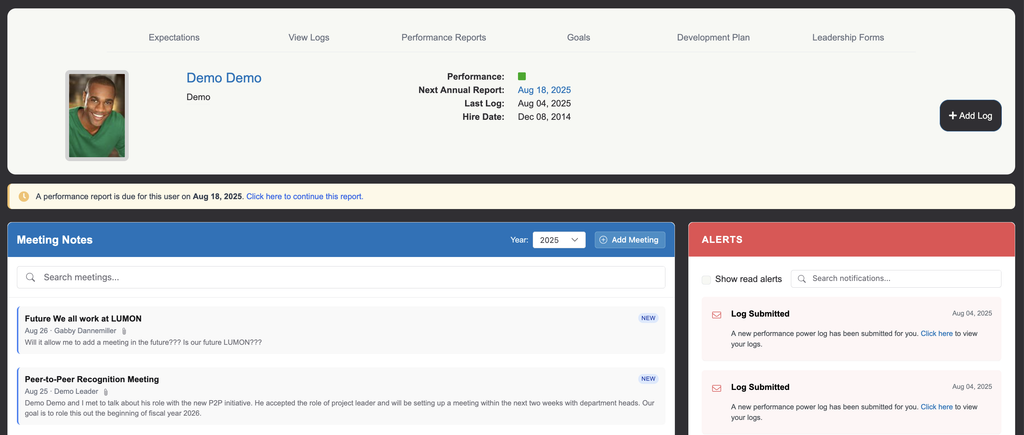
The Meeting Notes feature is displayed in the upper left-hand corner of an employee’s dashboard. Leaders can enter meeting notes, which are visible to that employee and all leaders with access to the employee’s dashboard.
To create a meeting note, go to the dashboard for that employee and click the ADD MEETING button in the top right-hand corner of Meeting Notes. Add a meeting title, then any notes and attachments you want to include. Don’t forget to save the.meeting note when you’re finished.
Did You Know…?
- Meeting Notes require employee acknowledgement. Leaders and employees have a record of their discussions, and documented agreement on what was discussed.
- They’re great for one-on-ones, but you can use Notes with other TrackIT features, too. Logs, reviews, goals, counseling forms, PEI, and development forms can all incorporate and utilize TrackIIT notes.
- Only leaders can enter TrackIT Meeting Notes.
- Meeting Notes have no impact on employee performance scoring.
Need to know how to view meeting notes and details? Check out the Meeting Notes tutorial in our Help Center.
How Notes Can Help Your Team
Use the TrackIT 3.0 Meeting Notes feature however your department needs. It’s adaptable and multifunctional. Fire chiefs and emergency response teams might use it to:
- Improve Performance Reviews: Whether getting ready for 6-month reviews or auditing EOY performance, TrackIT notes give leaders the necessary context to make informed decisions for their team and department.
- Categorize Key Updates: You can label, search, and categorize TrackIT notes by keyword. This makes it easy to find all related updates quickly.
- Is this covered/done? Try searching by keyword from your TrackIT dashboard to get the latest updates, notes, and reports.
- Ensure Preparedness: With thorough notes, no details get missed. Nothing falls through the cracks. Leaders can seize every opportunity to help their team tighten up, or to improve morale with a much-needed boost.
- Need specific notes taken department-wide? Create a template leaders can copy and edit as a new note.
- A peer-to-peer recognition meeting template might include fields for: each teammate’s name, the accomplishment being recognized (along with relevant date/location), and the skills you noticed in action.
- Need specific notes taken department-wide? Create a template leaders can copy and edit as a new note.
- Bolster Teamwork: The more streamlined communication, the more cohesive the teamwork— and stronger the results. Having defined processes for note-taking and sharing updates keeps everyone aligned.
Want to explore more TrackIT 3.0 features? Check out our latest admin and reporting updates.
Created with Fire and Dispatch in Mind
We’re proud to offer the only performance management system designed for first responders. We added Meeting Notes and other new TrackIT features after feedback from 911 dispatch teams, fire chiefs, and other public safety teams. We’re committed to continual improvement to support optimal performance across your department.
Have questions about how to get the most from TrackIT? Have suggestions for new (or improved) TrackIT features? Book a call to get your questions answered and discover what’s possible.